Claude Code configuration hierarchy

Introduction
In this post, we’ll explore where Claude Code keeps its configuration and which file wins when the same thing is defined in more than one place. By the end of this post, you’ll know where to put a setting so that it applies only to you, to your team, or to the whole organization.
Configuration hierarchy
Claude Code reads its configuration from four scopes. The table below is based on a slide from Boris Cherny’s talk Practical Tips on How to use Claude Code, updated to the current file names.
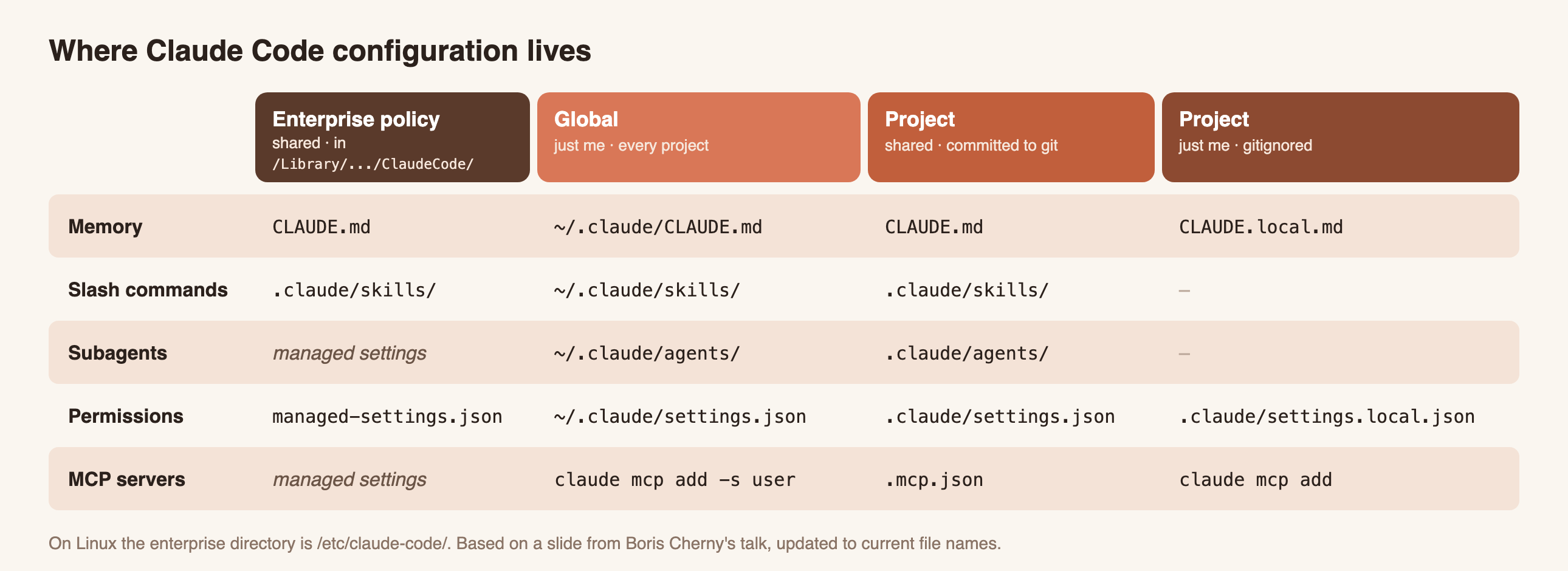
What each column is for:
- Enterprise policy is deployed by IT to every developer’s machine. Nobody can override it, so it’s the place for security rules. On Linux, the files live in
/etc/claude-code/instead. - Global files live in your home directory and apply to every project you open. Put your personal preferences here, like your commit message style or the tools you like.
- Project (shared) files are committed to the repository, so the whole team gets them after
git pull. This is where build commands, conventions and team permissions go. - Project (just me) files are your personal overrides for one repository. They stay out of git: Claude Code adds
.claude/settings.local.jsonto your git excludes the first time it writes it, and you should addCLAUDE.local.mdto.gitignoreyourself.
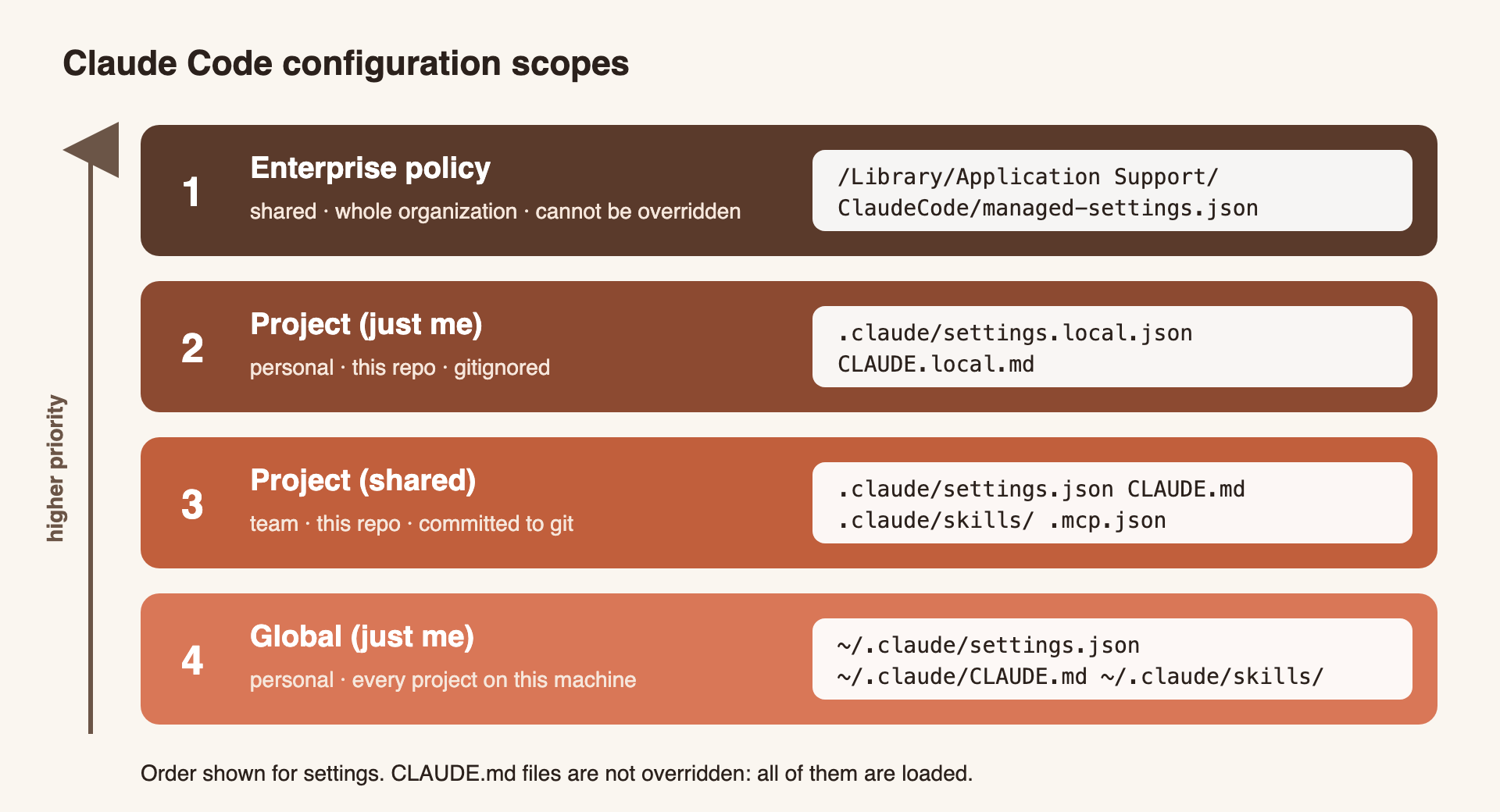
Which one wins?
There isn’t one rule for everything. Each type of configuration resolves conflicts differently.
Settings and permissions
For a single value like model, the highest scope wins.
Lists like permissions.allow are merged from all scopes.
For permissions, deny always beats allow.
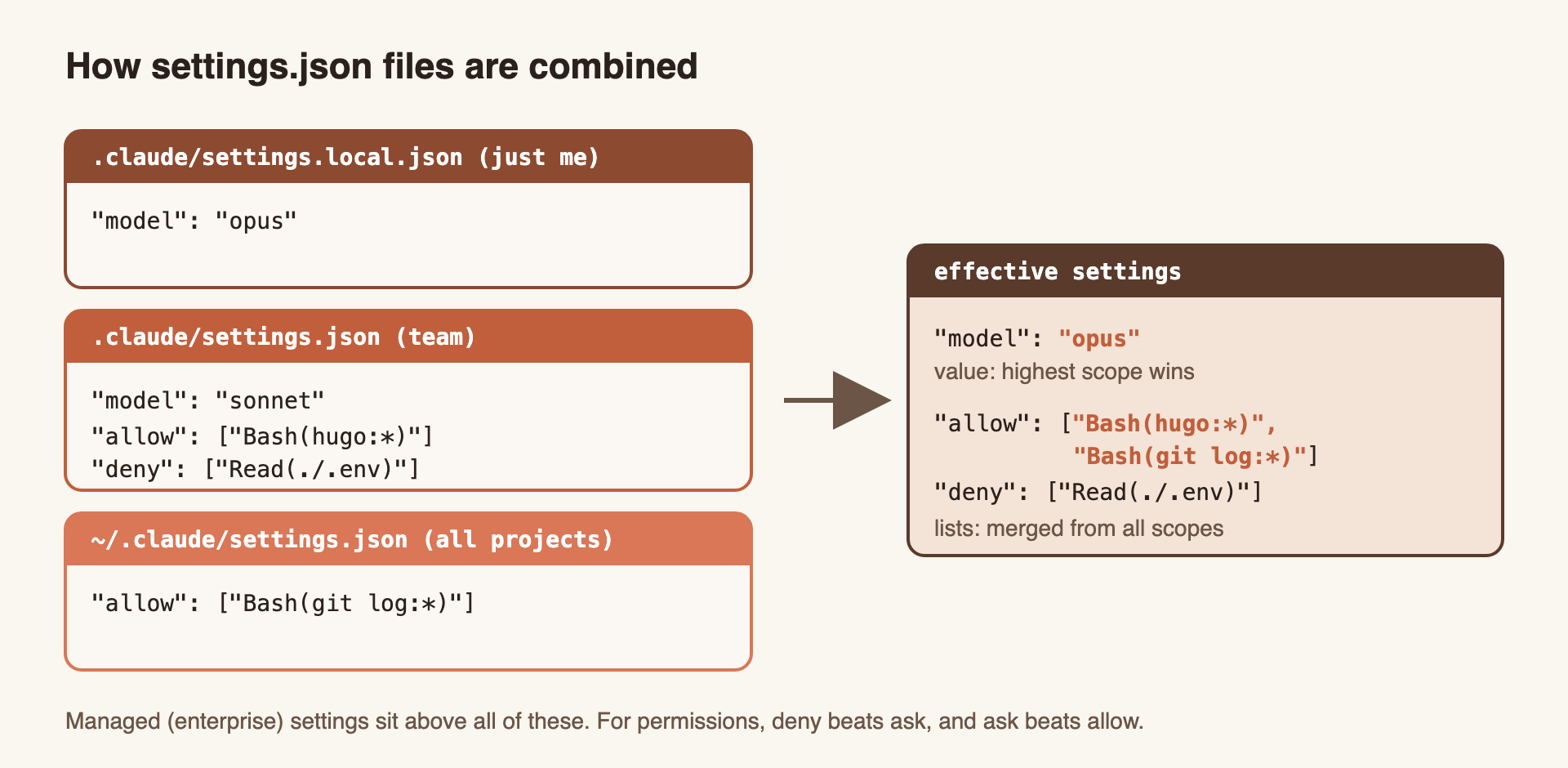
A typical team file allows the commands everyone runs every day and blocks access to secrets:
{
  "$schema": "https://json.schemastore.org/claude-code-settings.json",
  "permissions": {
    "allow": ["Bash(npm run test:*)", "Bash(npm run lint)"],
    "deny": ["Read(./.env)", "Read(./.env.*)"]
  }
}
If you prefer a different model in this one repository, don’t change the team file.
Put "model" in .claude/settings.local.json and only your sessions change.
You can also pass claude --settings '{...}' for a single session. It sits between the enterprise policy and the local file.
CLAUDE.md
CLAUDE.md files don’t override each other.
Claude loads all of them, one after another, from the broadest to the most specific.
A CLAUDE.md in a subdirectory loads only when Claude opens a file in that subdirectory.
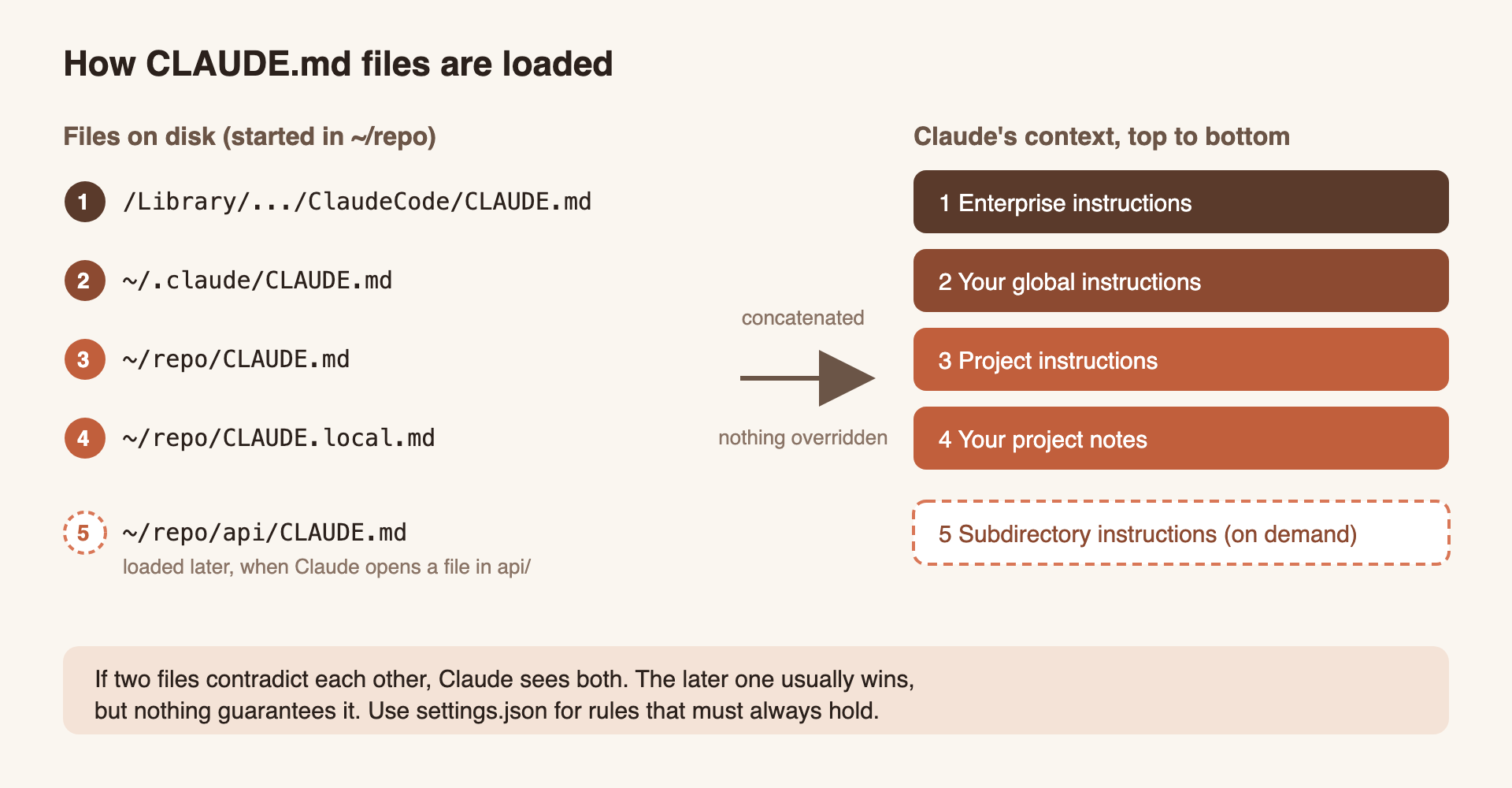
If two files contradict each other, Claude sees both and may follow either one. So don’t rely on the order. Keep the files consistent instead, and if you need a tie-breaker, write it down, for example “A project’s CLAUDE.md wins when it conflicts with this file.”
Two features help keep these files short:
- Imports:
@path/to/fileinside aCLAUDE.mdpulls another file into context, e.g.See @README.md for the project overview. - Rules: Markdown files in
.claude/rules/. A rule with apathsfield loads only when Claude works on matching files:
---
paths:
  - "src/api/**/*.ts"
---

- Every endpoint validates its input.
- Errors use the standard error response format.
.env” in CLAUDE.md is a request to the model.
"deny": ["Read(./.env)"] in settings.json is enforced by Claude Code.Skills, subagents and MCP servers
When two scopes define something with the same name, only one of them is used. Watch out: your personal skill beats the project’s one, but the project’s subagent beats your personal one.
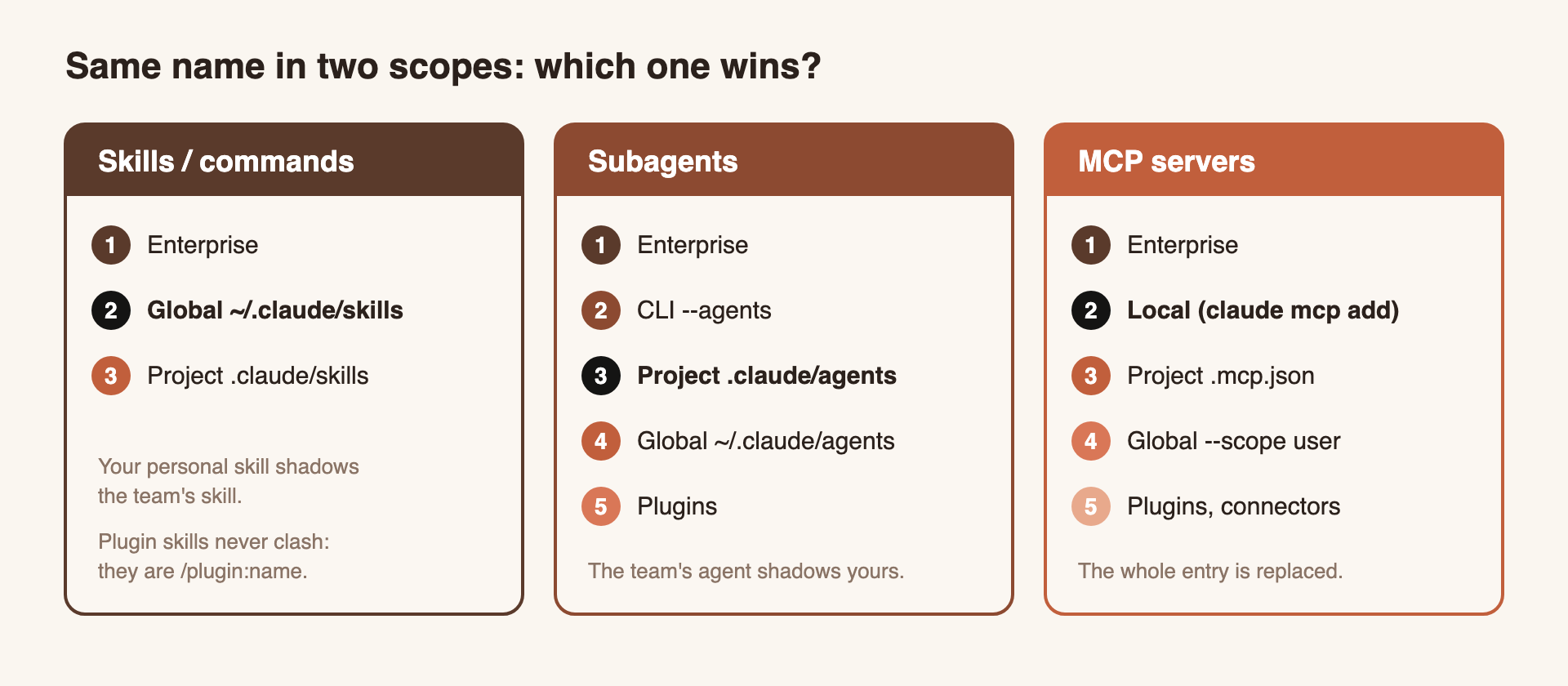
In practice: if you keep a personal /deploy skill and your team later commits its own /deploy, you’ll keep running yours without noticing.
Give personal skills names that a team is unlikely to use.
For MCP servers, the entry from the winning scope is used as a whole. Fields like the URL and headers are never mixed between scopes.
Checking what was loaded
When something doesn’t behave the way you expect, don’t guess. Ask Claude Code:
| Command | Shows |
|---|---|
/status | which settings files were loaded |
/context | which CLAUDE.md, rules and memory files are in context |
/memory | opens your CLAUDE.md files for editing |
claude doctor | settings entries that were rejected |
Example: this blog
This blog’s repository is set up in exactly this way.
The project CLAUDE.md describes how the blog is built: Hugo commands, where posts live, and the structure every post follows.
The shared .claude/settings.json allows hugo and read-only git commands, and blocks reading .env files.
My global ~/.claude/CLAUDE.md contains only imports of personal rules that I keep in a separate git repository:
@~/.claude/config-ai/rules/general.md
@~/.claude/config-ai/rules/git.md
@~/.claude/config-ai/rules/testing.md

A project's own CLAUDE.md adds to these and wins where the two conflict.
This way, my personal rules follow me to every project, and each repository describes only what is specific to it.
Summary
Claude Code’s configuration has four scopes: enterprise, global, project and project-local.
Settings are combined by priority, with lists merged, while CLAUDE.md files are all loaded together.
Put team rules in the committed project files, personal preferences in ~/.claude/ or the local files, and anything that must always hold in settings.json rather than in CLAUDE.md.
References
- Boris Cherny, Practical Tips on How to use Claude Code (YouTube)
- Claude Code settings documentation
- Claude Code memory documentation
- Claude Code
.claudedirectory documentation - Diagrams rendered from SVG sources stored next to this post
- Photo by Leon JL on Unsplash